

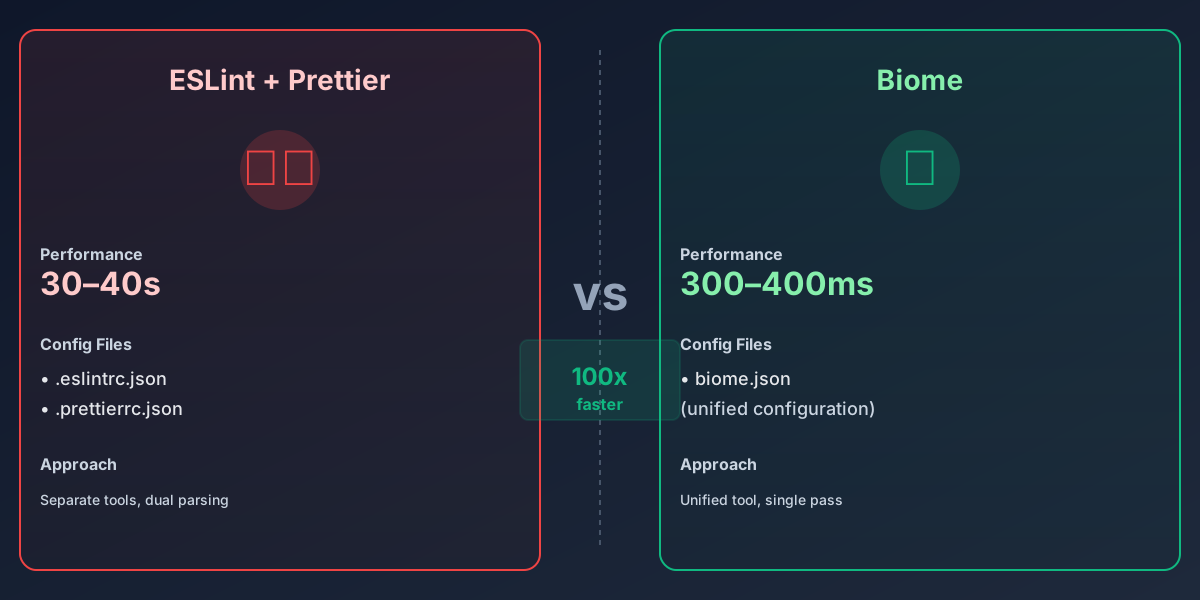
When I first benchmarked Biome against my team’s existing ESLint + Prettier setup, I thought the numbers were a measurement error. Forty seconds down to four hundred milliseconds. That’s not a performance improvement — that’s a magnitude shift. And it’s making me rethink what we should accept from our developer tools in 2026.
The ESLint and Prettier Tax#
Let’s be honest about what we’ve normalized. A typical modern JavaScript project runs linting and formatting on save, on commit, and in CI. Each pass takes 30–40 seconds on a medium-sized codebase. Multiply that across a team of ten people running linters 3–4 times per day, and you’re burning through thousands of developer-hours per year on waiting for tools to finish.
This isn’t new pain — it’s just old pain we’ve stopped questioning. ESLint and Prettier are foundational tools. They’re battle-tested, well-documented, and everywhere. But they were built in an era when “good enough” meant “finishes in 30 seconds.” The JavaScript ecosystem has momentum, and momentum is hard to redirect.
Enter Biome#
Biome is a single tool written in Rust that handles linting, formatting, and import sorting in one pass. No chaining. No dual configuration files. One command, one configuration object, one mental model.
The performance is aggressive. Biome processes the same codebase in 300–400 milliseconds. That’s not a marginal win — that’s the difference between “instant” and “perceptible.” Your linter feedback on save becomes synchronous with your editor keystroke. Formatting becomes something you don’t wait for.
The architecture is unified in a way that matters. ESLint and Prettier live in separate tools with overlapping concerns. You configure them separately, they parse the code separately, and they sometimes conflict with each other (which is why every ESLint + Prettier setup adds a compatibility layer). Biome eliminates that friction entirely. It lints and formats in one pass, with a single rule set.
The Real Problem: Not All Rules Migrate#
Here’s where the honest take comes in: Biome is not a drop-in replacement. If you rely on specific ESLint plugins — like eslint-plugin-react, eslint-plugin-vue, or custom rule sets your team built — you won’t find exact equivalents in Biome. Biome ships with sensible defaults for JavaScript, TypeScript, JSX, and JSON, but it’s opinionated. It will not replicate every rule in every plugin ecosystem.
This is both a strength and a friction point. The strength: Biome’s rule set was designed by people who thought about what actually matters, rather than accumulated from fifteen years of third-party contributions. The friction: if your setup includes rules from three different plugins, migrating to Biome involves trade-offs.
For most teams, that trade-off is worth it. The rules you lose are rarely the ones you’d die for. The ones Biome provides are solid, well-reasoned, and often better than the alternatives. But for teams with heavily customized ESLint setups, this is a real migration cost.
What This Signals About JavaScript Tooling#
Biome didn’t invent the insight that JavaScript tooling had become bloated. The whole ecosystem has been moving in this direction: consolidation, rewrite in Rust, performance-first design. We’ve seen it with Esbuild (which replaced webpack/Parcel/Rollup in many workflows), with SWC (which replaced Babel), and with Turbopack (which aims to replace webpack entirely).
This mirrors what’s happening in the JavaScript runtime space itself, where Rust-based runtimes like Deno and Bun are reshaping the landscape. The Rust rewrite of Bun’s core demonstrates the same pattern: performance, memory safety, and developer experience become table stakes when you redesign from first principles. The same consolidation trend is visible in Python’s tooling evolution where consolidated tools are replacing fragmented ecosystems.
There’s a pattern here. The JavaScript ecosystem accumulated best practices, good intentions, and performance compromises. Then people wrote new tools in Rust, designed them from scratch to be fast, and discovered that velocity matters more than perfect compatibility with legacy plugins.
Biome is the next domino. I expect that within 18 months, ESLint and Prettier will feel like Webpack felt in 2020 — technically still used, but no longer the default choice for new projects. When frameworks and runtimes like Deno 2.3 ship with Biome built-in, the shift accelerates.
The Migration Path Is Real, Not Hypothetical#
I’ve migrated a 50,000-line JavaScript codebase to Biome. Here’s what that looked like:
- Install Biome — npm install -D @biomejs/biome
- Initialize config — npx biome init (generates a sensible starting point)
- Adjust rules — your team’s linting philosophy probably overlaps with Biome’s defaults by 80–90%
- Migrate CI — replace your lint and format scripts
- Remove old tools — npm uninstall eslint prettier eslint-config-* (and you’ll see your node_modules shrink)
The first pass usually surfaces a few rules you want to disable or adjust. That takes an hour or two. The formatting changes are automatic. You run biome check --write once, commit the diff, and move forward.
The real migration cost isn’t technical — it’s social. Your team’s linting philosophy might have opinions that Biome doesn’t share. That’s a conversation to have, not a blocker.
My Take#
I think Biome is the right call for new projects starting today, and a worthwhile migration for existing codebases. The performance difference alone justifies it — synchronous linter feedback on save is not a luxury, it’s table stakes. But the real win is simplicity: one tool, one configuration, one rule set, one community.
ESLint and Prettier served us well. They solved real problems in a world where JavaScript performance meant “finished within 30 seconds.” But Biome points to where the ecosystem is going: fast, opinionated, and unified. The JavaScript ecosystem has a habit of consolidating around tools that get the fundamentals right. Biome got them right.
The next question isn’t “should I migrate to Biome?” It’s “what else am I running as two separate tools that should be one?” This consolidation pattern is becoming the norm across the developer experience, from AI-assisted testing frameworks that integrate multiple concerns into unified workflows to build tools that combine multiple phases into single passes.


